

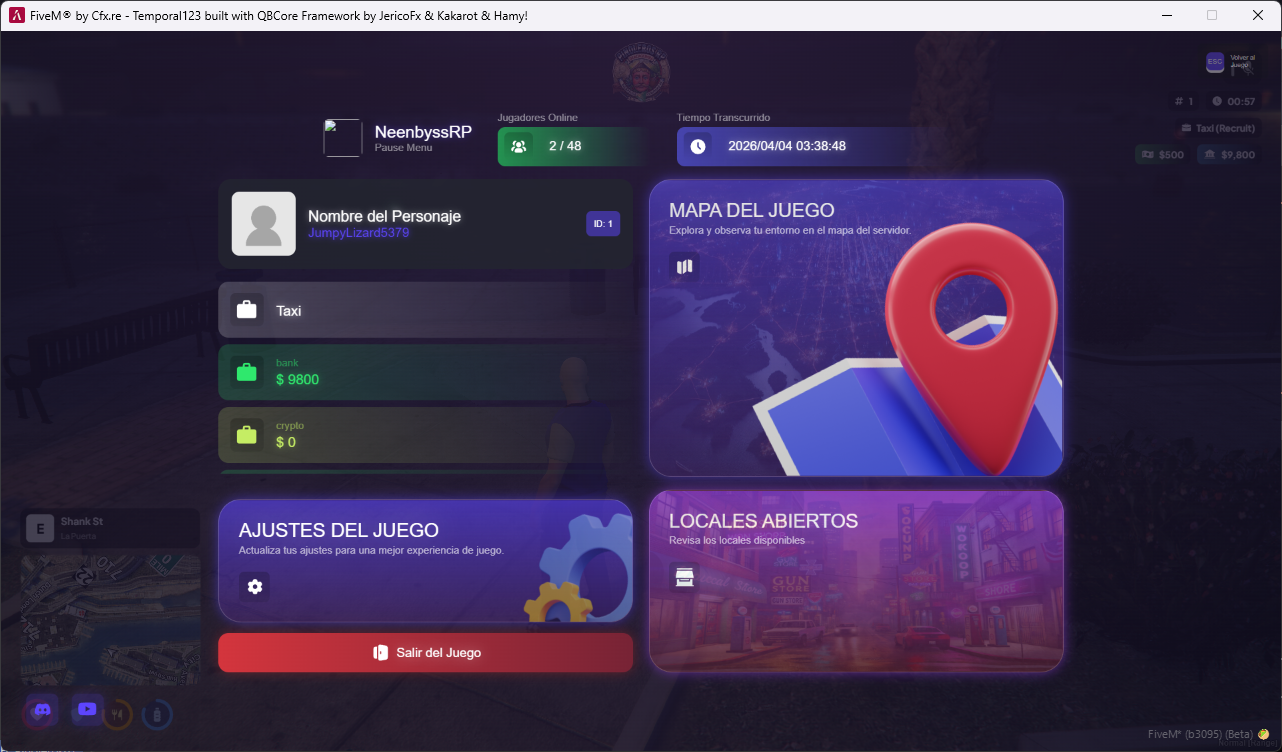
Replace the boring vanilla GTA V pause menu with a modern, animated, and fully customizable interface.
━━━━━━━━━━━━━━━━━━━━━━━━━━━━━
✨ FEATURES
• Real-time player info — name, ID, job, grade, mugshot, and color-coded ping indicator
• Multiple balances — bank, cash, black money, crypto and more (fully configurable)
• Server stats — online players, in-game date and time
• Open businesses panel — employees announce their business is open with /localopen and it shows up on every player's pause menu
with name, icon, and elapsed time
• Quick actions — GTA settings, game map, and exit server
• Social media buttons — Discord and YouTube built-in
• Smooth animations — fluid entrance transitions and effects
• Audio feedback — sound effect when opening the menu
━━━━━━━━━━━━━━━━━━━━━━━━━━━━━
🏪 OPEN BUSINESSES SYSTEM
Employees can announce their business is open using a simple command. The announcement appears on every player's pause menu
showing:
— Business name and icon
— Employee name who made the announcement
— Time elapsed since opening
— Badge with open businesses counter
— Configurable duration (or until disconnect)
— 13+ pre-configured businesses (mechanic, hospital, police, taxi, real estate, bars, etc.)
━━━━━━━━━━━━━━━━━━━━━━━━━━━━━
⚙️ CONFIGURATION
Everything is configured from a single file (shared/main.lua):
— Server logo and name
— Farewell message on exit
— Business list (name, label, FontAwesome icon)
— Announcement duration
— Minimum grade to announce
━━━━━━━━━━━━━━━━━━━━━━━━━━━━━
🛠️ TECH STACK
— Frontend: Vue 3 + Headless UI
— Styling: Custom CSS + Animate.css
— Icons: FontAwesome 5
— Backend: Lua 5.4
— Bridge: nb-bridge (multi-framework support)
━━━━━━━━━━━━━━━━━━━━━━━━━━━━━
📋 REQUIREMENTS
— nb-bridge (included / available separately)
━━━━━━━━━━━━━━━━━━━━━━━━━━━━━
🔧 COMPATIBILITY
✅ ESX
✅ QBCore
✅ Standalone
━━━━━━━━━━━━━━━━━━━━━━━━━━━━━
📦 INSTALLATION
1. Install nb-bridge on your server
2. Drop nb-pausemenu into your resources folder
3. Add "ensure nb-pausemenu" to your server.cfg
4. Configure shared/main.lua with your server details
5. You're good to go!
━━━━━━━━━━━━━━━━━━━━━━━━━━━━━
💬 SUPPORT
Support included via Discord. Free updates