

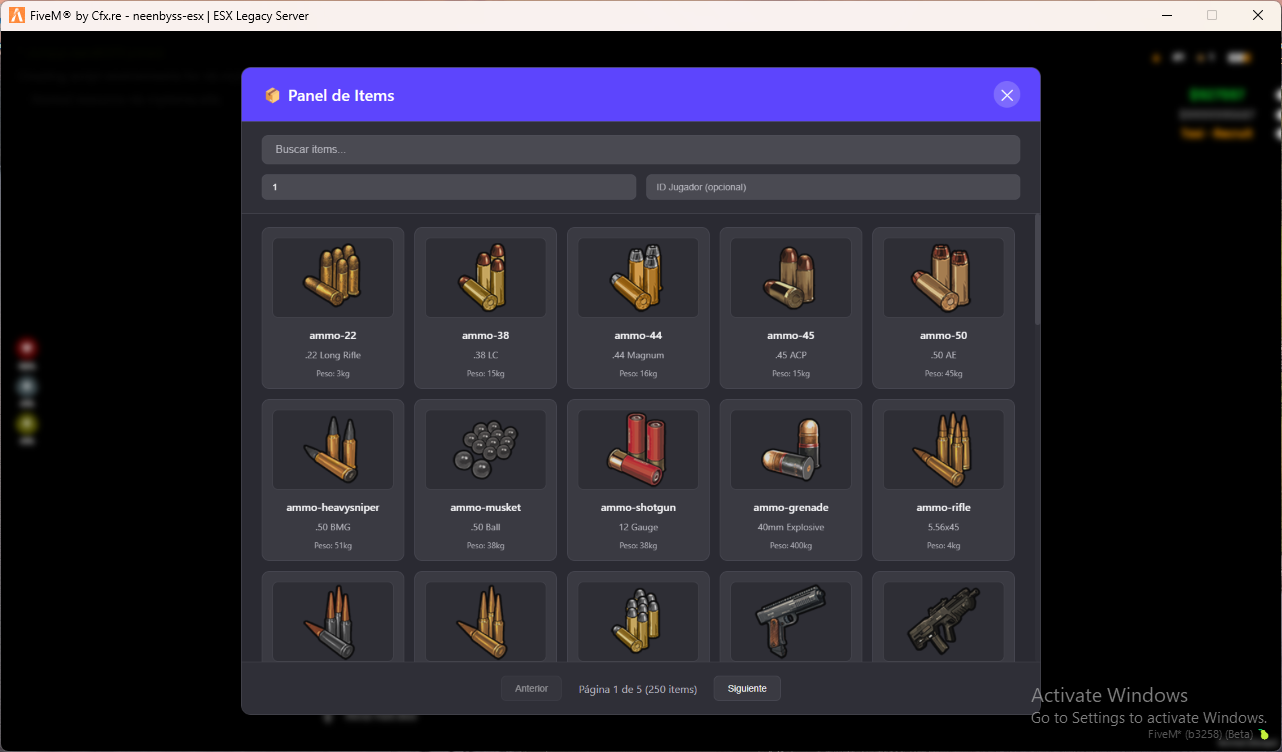
Item Management Panel
NB-MyItems is a professional server-side item management panel for FiveM, designed for administrators and staff.
It allows viewing all registered items on the server and giving items efficiently through a visual interface.
Built for administration, testing, events, and moderation workflows.
Core Functionality
- Visual panel listing all registered items
- Real-time item search
- Give items to yourself or other players by ID
- Customizable quantity limits
- Automatic framework detection (ESX / QBCore)
- Inventory-aware item images
- Server-side permission control (license-based)
- Optimized pagination for large item lists
Supported Frameworks
- ESX Legacy
- QBCore
Framework is detected automatically at runtime.
Inventory Support
Full Functional Support (get items, give items, images)
- ox_inventory
- Framework: ESX only
- QBCore incompatible from v2.42.1 (2024-08-31)
- qb-inventory
- Framework: QBCore only
- origen_inventory
- Framework: ESX and QBCore
Image-Only Support
The following inventories are detected only to resolve item image paths.
No item listing or item giving is possible with them.
- ps-inventory
- lj-inventory
- qs-inventory
To use this script with full functionality, one of the supported inventories above is required.
Requirements
- FiveM server (updated)
- ESX or QBCore framework
- One compatible inventory system
- ox_lib (optional, for enhanced notifications)
Installation
- Place the resource in your
resourcesfolder - Add to
server.cfg:ensure nb-myitems.utils - Configure permissions in
config.lua - Restart the server
Permissions System (License-Based)
Access is controlled using Rockstar licenses.
Example configuration:
Config.AllowedLicenses = {
    ['license:xxxxxxxxxxxxxxxxxxxxxxxxxxxxxxxxxxxxxxxx'] = true,
}
Advantages:
- Framework-independent
- No group or ACE configuration required
- Secure and simple
Command Usage
Default command:
/myitems
Functionality:
- Open item panel
- Search items by name
- Select quantity
- Optional target player ID
- Give item instantly
Configuration Options
- Custom command name
- Items per page
- Default quantity
- Maximum allowed quantity
All settings are configurable in config.lua.
Performance Notes
- Designed for servers with large item databases
- Pagination prevents UI lag
- No heavy dependencies
- Optimized NUI loading
Important Notes
- Item availability depends on the active inventory system
- If an item image is missing, a placeholder is shown
- Script does not modify item definitions
- Script does not bypass inventory limits or weight rules